Control OpenClaw without touching a keyboard—from your pocket. Speak into your phone, and seconds later a timestamped line lands in a file on your server. A thought becomes state. Your voice becomes infrastructure.
Why this matters: ideas almost never show up when you’re sitting upright at a keyboard, ready to type. They hit while you’re walking, driving, showering, or drifting to sleep. Usually they disappear. This setup fixes that. Your voice goes straight into OpenClaw’s workspace—no app to open, no typing, no “I’ll log it later.” The agent’s context stays current because the same system that can act later is the system receiving the idea now. Voice is the lowest-friction input you have. This makes it first-class.
Note: A raw agents file that distills this post and the project is here: hey-siri-openclaw-agents.md
OpenClaw on a Hetzner server, two Telegram bots, and an Apple Shortcut. You run the Shortcut My Idea Is with your voice—or type log: ... in Telegram—and the bot appends a line to idea-log.md. It took two days to build. This post is the runbook: the phases, the scripts, the architecture, and the failures that forced the design.
Two days. Two bots. Zero taps.
March 7–8, 2026. Say: “Hey Siri, my idea is …” The Shortcut posts to a private Telegram channel. OpenClaw on the server sees the message and appends it to the log. Or skip Siri, open Telegram, and DM log: my idea to the bot. Same result.
Stack:
- Hetzner Cloud in a fresh project with its own API token and server
- Terraform for the server, SSH key, persistent volume, and cloud-init (Tailscale, UFW, Fail2ban, Node 22, OpenClaw, systemd gateway)
- OpenClaw with profile
main, bound to127.0.0.1on a custom port so the gateway is never public - Two Telegram bots: LOGGER (the OpenClaw bot you talk to directly) and MESSENGER (used only by the Shortcut to post into a private channel)
- A private Telegram channel where only the two bots are members; the Shortcut posts there with the MESSENGER token, and LOGGER receives those messages as
channel_postand logs them - An Apple Shortcut that dictates, URL-encodes
log: <text>, and hits the Telegram Bot API
That is the whole path.
Same philosophy as my Cursor + Rails post: every phase has a script, and nothing counts as finished until the script passes.
Architecture (high level):
Why I didn’t run it on my Mac (and why I needed two bots)
Dedicated server: the original plan was to run OpenClaw on my Mac under a locked-down user profile. Never as root. But a friend pushed back on running the agent on my primary machine at all, and he was right. If something goes wrong, I do not want my everyday laptop and my agent runtime sharing the same blast radius. So OpenClaw lives only on the Hetzner box. My Mac is just SSH, repo, and secrets. The iPhone is just Telegram and the Shortcut.
Two bots because Telegram forces it. The Shortcut cannot send as me without MTProto and a user login. It can only use the Bot API. So if the Shortcut sends using the LOGGER token, Telegram sees that message as being sent by the bot. Bots do not receive their own outbound Bot API messages. LOGGER would never see it.
The fix was a second bot: MESSENGER. The Shortcut uses MESSENGER’s token and posts into a private channel. LOGGER is an admin of that channel, so Telegram delivers the post to LOGGER as channel_post. Same log. Same result. Zero taps.
I first tried sending from MESSENGER directly to LOGGER in a DM. Telegram answered with: “Bad Request: chat not found.” That dead end is what forced the final architecture.
Validation or it didn’t happen. I never called a phase done until a script proved it. ./scripts/validate/run-all.sh runs phases 0.1 through 6 and stops on the first failure. For true reproducibility, recreate-and-validate.sh destroys the server, preserves the volume, applies Terraform again, lets cloud-init rebuild the box, and reruns the full validation path. Terraform plus push scripts gets the system back to green.
Message flow (two paths into the same log):
Validation loop:
A server that only answers to Tailscale and SSH
Fresh Hetzner project. Token in .env as HCLOUD_TOKEN. Terraform creates the server, your SSH key, and a persistent volume. On first boot, cloud-init does the rest: non-root user, Tailscale (if you provide the auth key), UFW locked to SSH and Tailscale, Fail2ban set to 3 strikes and a 24-hour ban, Hetzner backups enabled.
The OpenClaw gateway is never exposed to the public internet.
Prove it:
cd terraform && terraform init && terraform apply
ssh root@$(cd terraform && terraform output -raw server_ip)
ssh openclaw@$(cd terraform && terraform output -raw server_ip) 'tailscale status'
ssh openclaw@$(cd terraform && terraform output -raw server_ip) 'ufw status'
ssh openclaw@$(cd terraform && terraform output -raw server_ip) 'fail2ban-client status sshd'
./scripts/validate/run-all.sh
Phase 0.6 checks backups via the Hetzner API. It needs HCLOUD_TOKEN in the environment.
OpenClaw on the box (never as root)
Cloud-init already created the profile directory, a minimal config, Node 22, and OpenClaw itself. It also installed a systemd unit so the gateway comes up on boot. A single script from the Mac pushes the Anthropic API key to the server. Terraform never handles secrets.
Prove it:
./scripts/phase-1.3-configure-anthropic.sh
ssh openclaw@$(cd terraform && terraform output -raw server_ip) 'node -v && openclaw --profile main --version'
ssh openclaw@$(cd terraform && terraform output -raw server_ip) 'cat ~/.openclaw-main/openclaw.json | head -20'
./scripts/validate/phase-1.sh
The gateway runs with --allow-unconfigured so it can start before Telegram is wired up. Once Phase 2 is finished, a Telegram test message gets a reply.
Telegram: two bots and a channel (because one bot cannot see its own messages)
LOGGER is the bot you talk to. Create it with @BotFather, store its token in .env as TELEGRAM_LOGGER_BOT_TOKEN, and run the push script so the server receives it as TELEGRAM_BOT_TOKEN.
MESSENGER is the relay bot. Same process: add TELEGRAM_MESSENGER_BOT_TOKEN and TELEGRAM_MESSENGER_BOT_ID to .env. Do not push MESSENGER to the server. The Shortcut and validation scripts use that token from your Mac.
Get your numeric user ID from @userinfobot and set TELEGRAM_HUMAN_USER_ID. LOGGER’s allowlist must include both your user ID and MESSENGER’s ID.
Channel: create a private channel. Add both bots as admins. Not you. Get the channel ID (negative number) and store it as TELEGRAM_PASSIVE_CHANNEL_ID. The Shortcut uses the MESSENGER token and that channel ID to post log: <idea>.
Prove it:
./scripts/phase-2.1-create-telegram-bot.sh
curl -s "https://api.telegram.org/bot${TELEGRAM_LOGGER_BOT_TOKEN}/getMe" | jq -r '.result.id'
curl -s "https://api.telegram.org/bot${TELEGRAM_MESSENGER_BOT_TOKEN}/getMe" | jq -r '.result.id'
./scripts/phase-2.2-configure-telegram-channel.sh
./scripts/validate/phase-2.sh
curl -X POST "https://api.telegram.org/bot${TELEGRAM_MESSENGER_BOT_TOKEN}/sendMessage" -d "chat_id=${TELEGRAM_PASSIVE_CHANNEL_ID}" -d "text=log%3A%20channel%20test"
ssh openclaw@$(cd terraform && terraform output -raw server_ip) 'cat /mnt/openclaw-data/workspace/notes/idea-log.md'
If you use the default profile path instead of the persistent volume, replace /mnt/openclaw-data/workspace/notes/idea-log.md with ~/.openclaw-main/workspace/notes/idea-log.md.
The bug that made the agent rewrite the whole file
The workspace includes notes/idea-log.md. I deploy an AGENTS.md file that tells the agent: when you see log or log: ..., append a single line to that file.
That was the plan.
What actually happened: the agent tried a tiny in-place edit, failed, and stalled. The fix was blunt but reliable—tell the agent to read the entire file, append the new line in memory, and write the whole file back out. Not elegant. Very effective.
After that, I reran the Phase 3.2 script to push the updated instructions.
Prove it:
./scripts/phase-3.1-ensure-notes-workspace.sh
./scripts/phase-3.2-configure-notes-log-behavior.sh
./scripts/validate/phase-3.sh
Claude on the server
I used Anthropic from the beginning. Paid account, real key, no mock layer. Phase 1.3 pushes the API key to the box and sets the model. Phase 4 validates that the config points to Anthropic, that the key exists on the server, and that no secret leaked into the repo.
Prove it:
./scripts/validate/phase-4.sh
“Hey Siri, my idea is …” Then nothing.
Manual path: open Telegram, DM the LOGGER bot, type log: my idea, send.
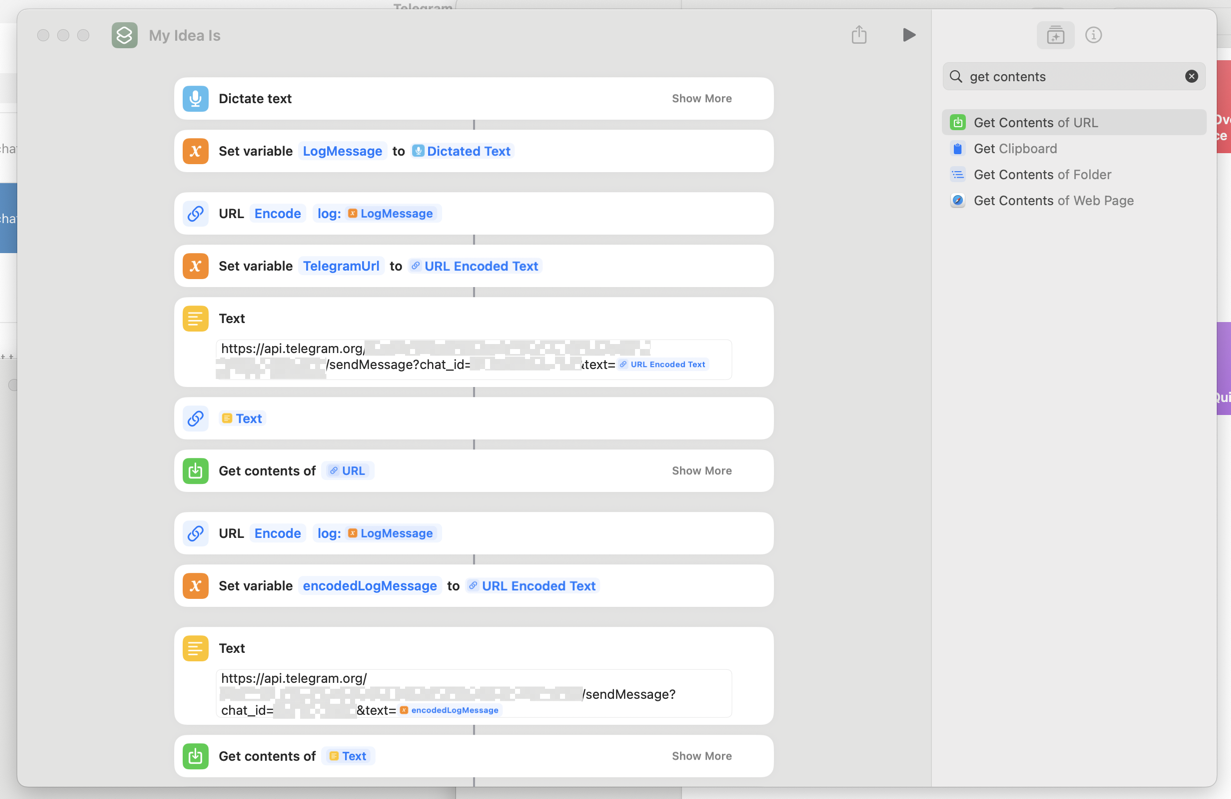
Passive path: the Shortcut dictates, URL-encodes log: <LogMessage>, builds the Telegram Bot API URL with the MESSENGER token and channel ID, and calls Get Contents of URL. No opening Telegram. No send button. LOGGER receives channel_post and appends to idea-log.md.
The Shortcut in the screenshot is not especially elegant. It may contain redundant encode or variable steps. That does not matter. What matters is that the request reaches the Bot API with the MESSENGER token and channel ID, LOGGER receives the channel_post, and the line lands in the log.
Important: URL-encode the message body or spaces and special characters will break the request.
Screenshot (tokens and channel ID redacted):
Validate Phase 5: the documented flow works from the iPhone. If TELEGRAM_API_ID and TELEGRAM_API_HASH are set, phase-5.sh sends log: Phase 5.1 validation as your user and verifies idea-log. Run the Shortcut once and confirm the new line on the server.
ssh openclaw@$(cd terraform && terraform output -raw server_ip) 'cat /mnt/openclaw-data/workspace/notes/idea-log.md'
./scripts/validate/phase-5.sh
What I didn’t build (yet)
Phase 6 is still mostly placeholder work: audit prompts and alerts for non-allowlisted users. The core hardening—Tailscale, Fail2ban, UFW, allowlist enforcement, DMs only where appropriate—was already handled in Phase 0 and Phase 2.
When Telegram said “chat not found”
Bot-to-bot DM: sending from MESSENGER to LOGGER in a direct chat returns Bad Request: chat not found. Telegram’s model is the constraint here. Bots do not behave like normal users, and bot-to-bot DM is not a reliable path for this. The private channel solved it because LOGGER, as a channel admin, receives channel_post.
Allowlist and channel_post: OpenClaw’s Telegram allowlist usually expects numeric user IDs. For channel posts, Telegram sends sender_chat (the channel ID), which is negative. I shimmed OpenClaw by running a small patch script on the server—patch-openclaw-allowfrom.js—that edits the installed dist so allowFrom accepts negative IDs (it changes the validation regex from positive-only to allow -100... channel IDs). After that, channel_post from the passive channel flows through the same pipeline as DMs and the LOGGER appends to the log. Check your OpenClaw version and docs; there’s also an optional webhook relay shim in the setup repo if your build doesn’t handle channel_post at all.
Appending to idea-log: the agent originally failed with an error like Edit in …/idea-log.md (42 chars) failed when it tried a tiny in-place edit. The fix was to update AGENTS.md so the agent reads the full file and writes back the new version with one appended line.
Recreate and secrets: after terraform destroy—with targeted destroy so the persistent volume survives—terraform apply gives you a fresh server and reruns cloud-init. But a new server is not the same thing as a fully restored system. You still need to re-push the LOGGER token with ./scripts/phase-2.1-create-telegram-bot.sh, rerun Phase 2.2 so the allowlist includes both your user ID and the MESSENGER bot ID, and restart the gateway so it reloads Telegram and model config. The recreate-and-validate.sh script handles that when the relevant environment variables are present.
Shortcut encoding: URL-encode the entire log: <text> payload. Not part of it. The whole thing. Otherwise spaces and punctuation will quietly break the request and you’ll waste time debugging the wrong layer.
What actually worked
Relentless validation worked.
Terraform plus cloud-init worked because one apply produced a real server, not half a server. Two bots plus a channel worked once I stopped fighting Telegram’s rules. The persistent volume worked because I could destroy and recreate the machine without losing the log. And one script—run-all.sh—worked because it forced the project to stay honest.
Why this is powerful (again): Siri becomes a direct input path into your AI agent. You do not need to remember the thought later. You say it once, and it is already in the shared workspace OpenClaw reads. That means more ideas captured, less friction, and one canonical log shared by you and the agent. The interesting part is not the plumbing. The interesting part is that voice finally has a clean path into the same system that can execute.
If you want to implement this for yourself
Keep secrets in .env, never in the repo. Push the LOGGER token to the server. Keep MESSENGER on your Mac and inside the Shortcut. Use a reusable Tailscale auth key so replacement servers can rejoin without drama. URL-encode log: <text> in the Shortcut. Run run-all.sh after every meaningful change. Run recreate-and-validate.sh with source .env when you want to prove that destroy-and-apply still gets you back to green. To read the log from your Mac:
ssh openclaw@<server> 'cat /mnt/openclaw-data/workspace/notes/idea-log.md'
The runbook and validation scripts live in the openclaw-setup repo. The repo is private for security. For more info or access: joseph.e.combs@gmail.com.